
Demand inside every build zone
Draw your build zones or build them from ZIP codes, then show only sign-ups and interested households to see how much demand sits in each zone. Click any home for its plan, status and install date.
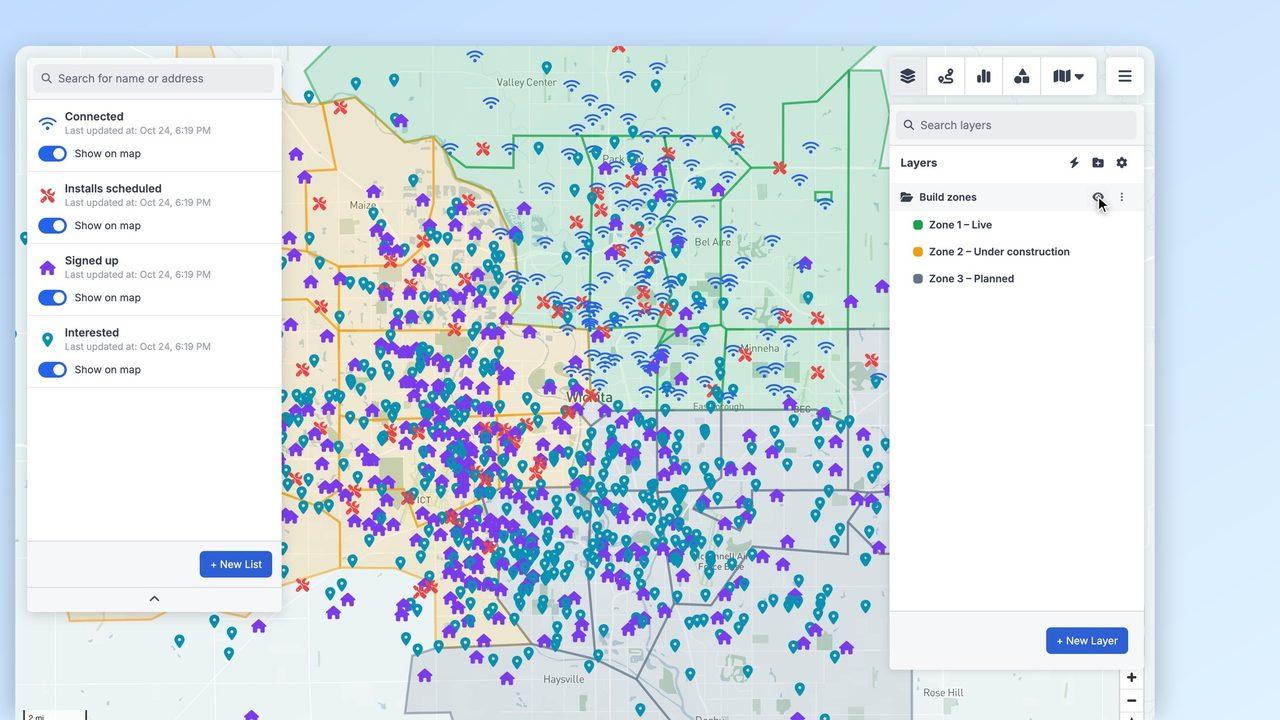
Where to build next
Turn sign-ups into a hexagon map to see where demand is densest, street by street, before you commit crews and capital to the next area.
Routes for install crews
Pick the day's scheduled installs, optimise the stop order and send the route to a technician's phone, with drive times between jobs.
More ways telecom & fiber internet teams use GeoMaps
Prioritise the next build
Compare sign-ups and interest per zone or ZIP code, so the next area you build already has customers waiting.
Run door-to-door campaigns
Give each sales rep a list of interested households in their area, and limit reps to the records they own in your CRM.
Schedule installs
Group installs by area, plan efficient routes for crews and let technicians update records from the field.
What customers say
“Fantastic! Thank you for that quick update; this will be very useful for us. And those filtering instructions sound perfect for our use case.”
Features you'll use
Connect the data you already have
See all integrations


FAQ
- Can I put our network footprint and build zones on the map?
- Yes. Draw zones by hand, build them from ZIP codes or counties, or import existing boundaries from KML, GeoJSON or a Shapefile. Lists can then be filtered to the homes inside a zone.
- Can door-to-door reps see only their own leads?
- Yes. Turn on Permissions for your CRM data and each rep sees only the records they own, while managers and admins see everything.
- Does it work with our CRM or billing data?
- GeoMaps connects directly to CRMs such as OnePageCRM, LeadConnector, Close and Capsule, to Google Sheets and Excel, and to PostgreSQL or MySQL databases. Anything else can come in through the REST API.
- Can technicians use it in the field?
- Yes. The GeoMaps app for iPhone and Android shows the same lists and routes, opens turn-by-turn navigation and lets technicians update records on site.