
What balance territories does
- Each territory's total and % of the average, right-aligned in its Layers panel row
- Balance by number of records or the total of a number field, like revenue
- Updates as your data changes
- Works on any folder of territory layers, and on several folders at once
- Even out moves border ZIP codes or counties between neighbours until territories are even
- Review "now → after" for every territory before the new boundaries are saved
- Turn balance off per folder from the same window
Totals next to every territory
Turn on balance by revenue and each territory row shows its total and % of the average, so a lopsided split is obvious at a glance.
Now → after, before anything changes
Even out shows how far each territory is from the average today and where it lands after border ZIP codes or counties move. Nothing is saved until you confirm.
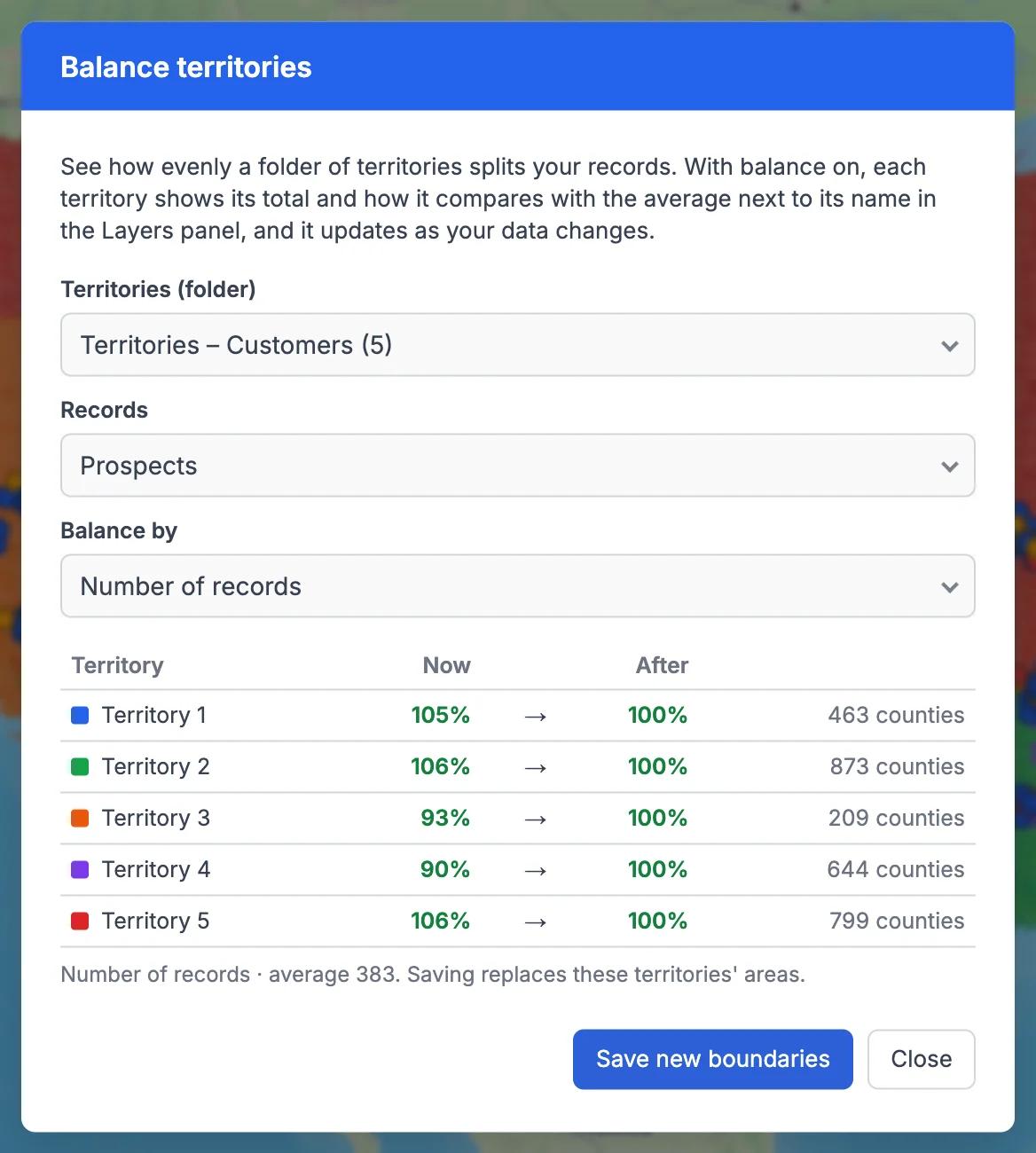
Balance Territories in GeoMaps
Territories drift. Accounts are won and lost, new records arrive from your CRM, and a patch that was fair last quarter is suddenly twice the size of its neighbour. Balance territories keeps that visible: pick a folder of territories, a list of records and what to balance by (number of records or the total of a number field), and each territory's row in the Layers panel shows its total and its % of the average.
The numbers update as your data changes, and you can balance several folders at once. Open it from the ⚡ button in the Layers panel or from a folder's ⋮ menu (Balance, right under Rename).
For territories built from ZIP codes or counties, Even out goes one step further: GeoMaps moves border areas between neighbouring territories until they're even, shows each territory's "now → after" figures, and saves the new boundaries only when you confirm.
It's part of GeoMaps' tools tools, so it works hand in hand with the rest of your map.
Where balance territories helps
Quarterly territory reviews
See at a glance which patches have grown too big or too small since the last review, without exporting anything.
Fair compensation and quotas
Balance by revenue to check that quota-carrying reps start from comparable territories.
Workload for service teams
Balance by number of jobs or customers so each technician's area stays manageable as the customer base grows.
Balance Territories FAQ
- Do my territories have to be auto-created?
- No. Balance works on any folder of territory layers. Even out needs territories built from ZIP codes or counties, because it moves those areas between neighbours.
- Where do the totals show?
- At the end of each territory's row in the Layers panel: the total and its % of the average. There's no separate legend.
- Does Even out change my territories straight away?
- No. It shows each territory's figures now and after, and saves the new boundaries only when you click Save new boundaries.
- How do I turn balance off?
- Open Balance territories for that folder and choose Turn off balance. The setting is saved in your browser.