
Small groups by neighbourhood
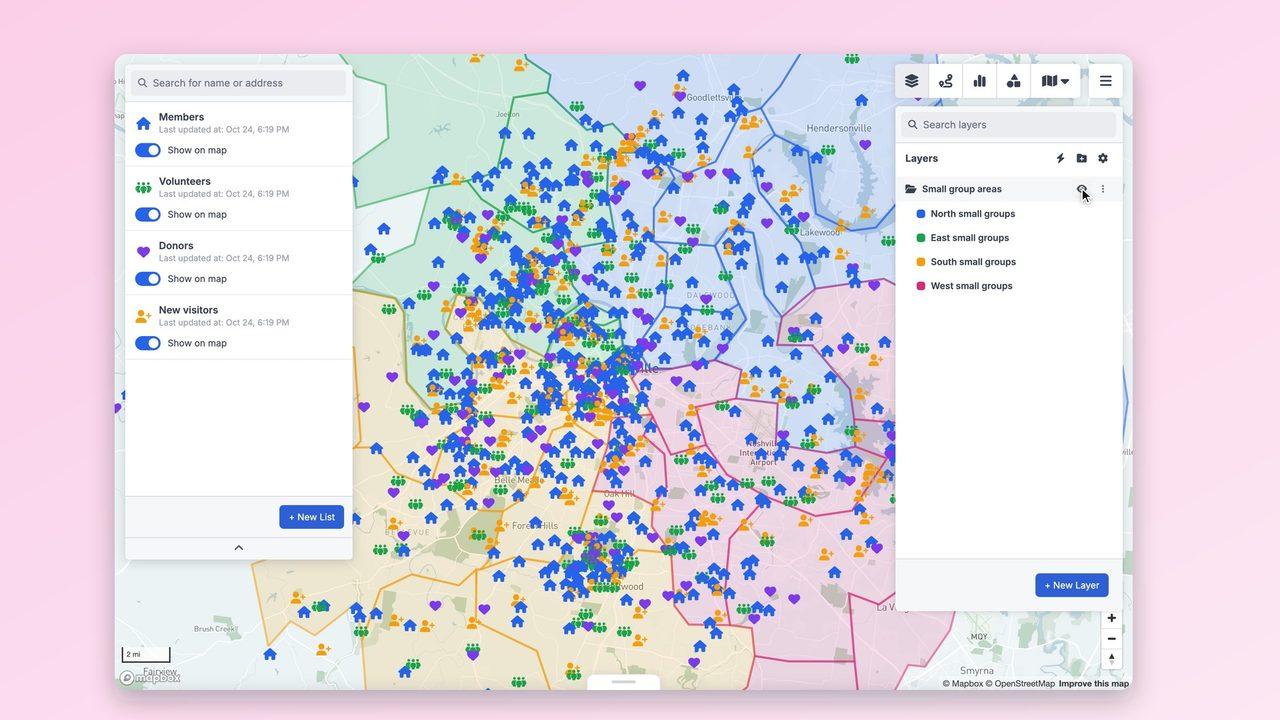
Group ZIP codes into small-group areas and see members, volunteers and new visitors in each. Click anyone for their group, ministry and when they last attended.
Outreach around your location
Draw a radius or drive-time area around your building or a planned site to see who lives within reach, then focus outreach where it counts.
Plan visits in one route
Pick the homes to visit, such as new visitors this month, optimise the order and take the route on your phone.
More ways nonprofits & churches teams use GeoMaps
Organise small groups
Split your community into neighbourhood groups so people meet close to home, and spot areas that need a new group.
Plan outreach and new sites
Combine drive-time areas with demographic data to see who lives near a planned campus, food pantry or program site.
Visits and follow-ups
Route pastoral visits, deliveries or volunteer follow-ups so a morning covers more homes.
Features you'll use
Connect the data you already have
See all integrations


FAQ
- Can we map people from Planning Center or a spreadsheet?
- Yes. Connect Planning Center, Google Sheets or Excel, or upload a CSV, and everyone with an address appears on the map.
- Is our member data kept private?
- Yes. Only people you invite to your workspace can see it, each with a role. If you share a map publicly, you choose exactly which lists it shows and can protect it with a password.
- Can we organise small groups by area?
- Yes. Build areas from ZIP codes or draw them by hand, then filter lists to the people inside each area.
- Can it help us choose a new location?
- Yes. Drive-time areas and demographic overlays show how many people, and which households, live within reach of a site you're considering.
Other industries
Field Sales & DistributionSolar & Home EnergyReal Estate & PropertyInsurance AgenciesFinancial Services & MortgageHealthcare & Medical SalesHome Services & ContractorsLogistics & Field ServiceRetail & FranchiseMarketing AgenciesTelecom & Fiber InternetSales Territory ManagementAgriculture & Food Producers